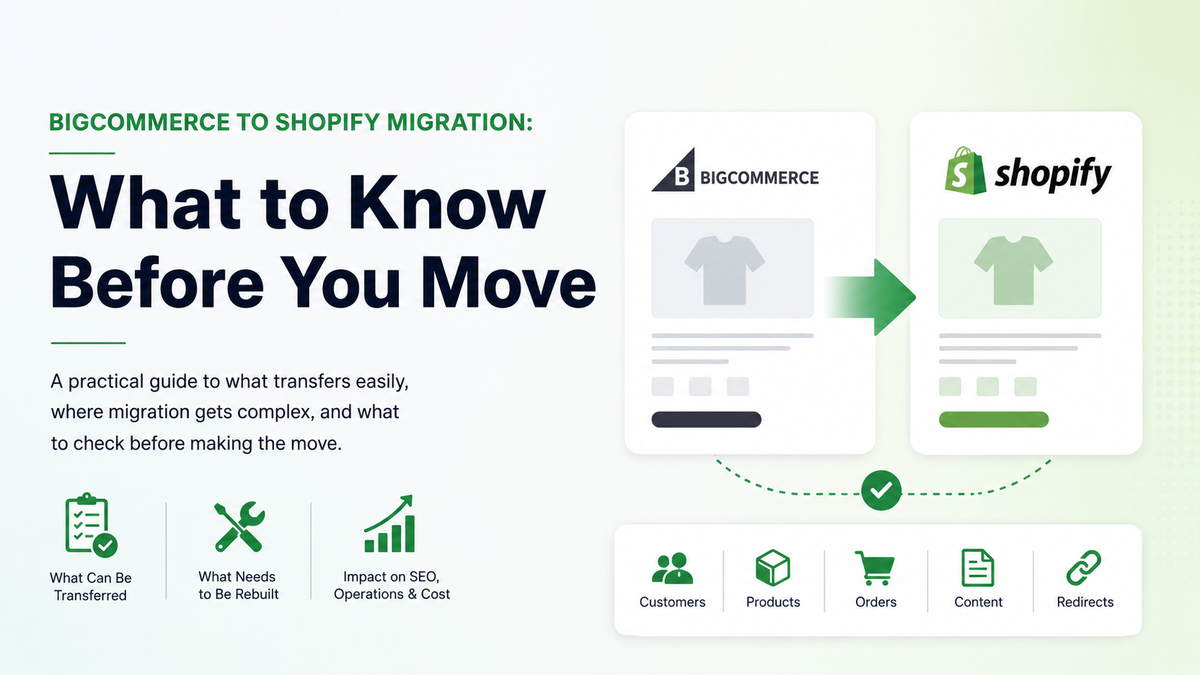

A BigCommerce to Shopify migration is usually straightforward when you are moving standard store data: products, customers, orders, content, and redirects.
It becomes more complex when your current store depends on ERP integrations, B2B pricing logic, custom checkout flows, multi-storefront setups, or custom apps.
Before moving from BigCommerce to Shopify, merchants should review three things: what can be transferred, what needs to be rebuilt, and what the migration could mean for SEO, operations, and cost.
This guide is not a BigCommerce vs Shopify comparison. If you are still comparing Shopify Plus with broader enterprise ecommerce platforms, we cover that separately in our guide to Shopify Plus vs enterprise ecommerce platforms.
According to Shopify’s migration checklist, moving to Shopify can include store setup, data migration, domains, payments, shipping, taxes, URL redirects, and launch preparation.
That is why the migration should be planned as a business and technical project, not just a data import.
Migration Is Not Just a Platform Switch
Most guides on how to migrate from BigCommerce to Shopify focus on the visible parts of the move: products, customers, orders, pages, blogs, and redirects.
Those parts matter, but they are not the full migration.
The bigger question is how your current store actually works.
If pricing comes from an ERP, if B2B customers see different prices, if checkout has custom rules, or if several storefronts share the same backend logic, the project needs more than a standard import.
BigCommerce also points out migration risks such as data loss, downtime, broken integrations, and SEO drops in its ecommerce migration guidance.
That does not mean these problems will happen. It means they should be checked before the migration starts.
A useful way to plan the project is to separate everything into two groups:
- What can be transferred.
- What needs to be rebuilt.
Products, customers, orders, and content may often sit in the first group. ERP logic, B2B pricing, custom checkout, multi-storefront rules, and custom apps usually sit in the second.
That difference is where the real timeline and budget usually start to become clearer.
Start With the Business Case Before the Build
Before starting the build, it helps to understand why the migration is happening in the first place.
For some merchants, moving from BigCommerce to Shopify may be connected to platform costs, internal workflows, app ecosystem, checkout needs, B2B requirements, or long-term maintenance. For others, the current setup may still work well enough, and the migration may not be urgent.
That is why the first step should not be “how fast can we move?” It should be “does this move make sense for the business?”
A simple business case should usually include:
- Current platform and development costs
- Expected Shopify plan, app, and development costs
- The cost of rebuilding custom workflows
- The risk of downtime or SEO disruption
- The internal time needed from operations, marketing, finance, and development teams
- What the business expects to improve after the move
This does not need to be a perfect financial model before the first conversation. But it should be clear enough to show whether the migration is worth exploring.
Based on Shopify’s migration checklist, merchants moving to Shopify may need to review areas such as payments, taxes, shipping, domains, data migration, and launch preparation before going live.
That matters because each of those areas can affect cost, timeline, or internal workload.
For example, a payment setup is not just a technical task. It can affect transaction costs, fraud settings, reporting, and how finance teams reconcile orders. Shipping is not just a checkout setting. It can affect delivery promises, margins, and customer support. Redirects are not just an SEO task. They protect the customer journey from old URLs to new pages.
A BigCommerce to Shopify migration is easier to manage when those details are reviewed before design and development start.
What Usually Moves Cleanly From BigCommerce to Shopify
The cleaner part of a BigCommerce to Shopify migration is usually the standard store data.
That often includes:
- Products and variants,
- Customer records,
- Order history,
- Pages and blog content,
- Images and media,
- URL redirects
This part can still require careful mapping and QA, but it is usually easier to scope than custom logic.
According to Shopify’s URL redirect documentation, merchants can create, import, export, edit, and delete URL redirects inside Shopify.
That matters because old BigCommerce URLs will often need to be mapped to the new Shopify URL structure.
The main point is simple: standard data can usually be transferred, but it still needs review. Products can have variant issues. Customers may need an account activation flow. Redirects may point to weak replacement pages. Content can lose formatting, metadata, or internal links.
This is usually not the hardest part of the migration, but it is one of the most visible after launch.
Where BigCommerce to Shopify Migration Gets More Complex
A BigCommerce to Shopify migration becomes more complex when the current store depends on custom logic.
This is usually where the timeline starts to change.
Examples include:
- ERP integrations,
- B2B pricing rules,
- Custom checkout flows,
- Multi-storefront setups,
- Custom apps,
- Subscriptions, loyalty, or review systems,
- Advanced tax or shipping rules
The issue is not that these things cannot be handled on Shopify. The issue is that they need to be identified early.
Based on BigCommerce’s ecommerce migration guidance, migration risks can include data loss, downtime, broken integrations, and SEO disruption.
That is why the complex part of the project should be mapped before development starts.
If an ERP controls inventory, pricing, orders, or fulfillment, it should not be treated as a small technical task. If B2B customers have different pricing, payment terms, or catalog access, that logic needs to be rebuilt or replaced. If checkout has custom rules, those requirements need to be checked against Shopify’s current checkout capabilities.
This is also where rebuilding custom apps on Shopify may become part of the project.
Some custom functionality can be replaced with Shopify apps. Some may need custom development. Some may no longer be needed if the workflow changes during migration.
The important part is to decide that before launch, not after.
Shopify URL Structure vs BigCommerce: Why Redirect Planning Matters
SEO risk is one of the most important parts of a BigCommerce to Shopify migration.
The reason is simple: BigCommerce and Shopify do not use the same URL structure.
When moving from BigCommerce to Shopify, product pages, category pages, blog posts, and other content may end up with different URL paths. If those old URLs are not mapped correctly, users and search engines can land on broken pages.
That can affect rankings, traffic, and revenue.
Shopify allows merchants to create and manage URL redirects inside the admin, according to Shopify’s URL redirect documentation.
Redirects should not be left until the end of the project.
A good migration process should include:
- Crawling the current BigCommerce store,
- Exporting all important URLs,
- Identifying pages with traffic, backlinks, or revenue value,
- Mapping old URLs to the closest new Shopify URLs,
- Testing redirects before launch,
- Monitoring Google Search Console after launch
The goal is not just to avoid 404 pages. The goal is to preserve as much SEO value and user continuity as possible.
Shopify URL structure vs BigCommerce is not a small detail. It directly affects how the migration is planned, tested, and monitored after launch.
ERP Integration, B2B Logic, and Custom Checkout Need Early Review
ERP integration is one of the first things to review before a BigCommerce to Shopify migration is scoped.
If the ERP controls inventory, pricing, product data, orders, fulfillment, or invoices, the migration team needs to understand how that flow works today.
A few questions matter early:
- What data moves between the ERP and the store?
- Which system is the source of truth?
- How often does data sync?
- What happens when the sync fails?
- Which workflows are manual today?
These answers can affect the migration timeline.
B2B logic should be reviewed in the same way. If different customers see different prices, catalogs, payment terms, or shipping options, that setup needs to be mapped before development starts.
This is especially important for merchants with negotiated pricing, wholesale customers, or private product access.
Custom checkout also needs early review.
Some BigCommerce stores use checkout logic that has been shaped over time: special fields, payment rules, delivery rules, customer group conditions, or B2B workflows.
Before rebuilding that on Shopify, the team should decide what needs to be recreated, what can be simplified, and what can be handled with native Shopify functionality or apps.
The main point is not that every custom workflow is a problem.
The point is that custom workflows should be visible before the project timeline is confirmed.
Rebuilding Custom Apps on Shopify
Rebuilding custom apps on Shopify is often where hidden migration work appears.
A store may look simple from the front end, but still rely on custom tools behind the scenes.
Examples include:
- Custom product configurators,
- Private pricing tools,
- ERP connectors,
- Shipping rule engines,
- Internal order management tools,
- Custom reporting dashboards,
- Loyalty or subscription logic,
- Product feed generators
Each custom tool should be reviewed before the build starts.
Some custom apps may still be essential. Some can be replaced with Shopify apps. Some can be simplified. Some may no longer be needed if the workflow changes during migration.
This step should happen before finalizing the scope.
If custom apps are discovered late, the project can become more expensive, timelines can shift, and launch testing can become harder.
If they are mapped early, the team can decide what to rebuild, what to replace, and what to remove from the migration plan.
Customer Accounts and Order History Need Special Attention
Customer data and order history are usually part of the standard migration scope.
But they still need careful review.
Customer records may include names, emails, addresses, tags, tax settings, marketing consent, and account status. Order history may include products, totals, discounts, tax, fulfillment status, payment status, and customer associations.
The main thing to check is not only whether the data can be moved.
It is whether the data will still be useful after the move.
For example, customer accounts may need a new activation or login flow after migration. Historical orders may need to be available for support, reporting, or customer service, even if they are not used in the same way as new Shopify orders.
This should be clarified before launch.
If customers cannot access their accounts, if support teams cannot find old orders, or if historical data is imported in a confusing way, the migration can create avoidable friction.
The safer approach is to define what customer and order data needs to move, how it will appear in Shopify, and how internal teams will use it after launch.
How Long Does a BigCommerce to Shopify Migration Take?
The timeline depends on the store.
For a relatively standard store, the core migration can often be planned in weeks. That usually includes data mapping, theme development, content migration, redirects, QA, and launch support.
For a more complex merchant, the timeline can extend.
The biggest factors are usually:
- ERP integration,
- B2B pricing and catalog logic,
- Custom checkout requirements,
- Multi-storefront setup,
- Custom apps,
- Large content or product catalogs,
- SEO migration risk,
- Internal approval and testing cycles
This is why it is hard to give a serious estimate before discovery.
A store with 20,000 products may be easier to migrate than a store with 2,000 products if the first store has clean data and standard workflows, while the second depends on custom pricing, ERP rules, and checkout logic.
The timeline should be based on complexity, not just catalog size.
For merchants in the $500K–$5M GMV range, a basic migration may be scoped more simply, while a custom setup usually needs deeper planning before anyone can give a reliable launch window.
The goal is not to move as fast as possible.
The goal is to move without breaking the parts of the business that already work.
What to Check Before You Migrate From BigCommerce to Shopify
Before you migrate from BigCommerce to Shopify, the most useful step is to create a clear migration checklist.
This does not need to be complicated, but it should cover the parts of the business that can be affected by the move.
A good checklist should include:
- Current platform costs,
- Current app and integration stack,
- Product and variant structure,
- Customer and order data,
- SEO URLs and redirects,
- ERP and fulfillment workflows,
- B2B pricing and customer groups,
- Checkout requirements,
- Payment and shipping setup,
- Analytics, pixels, and tracking,
- Custom apps or custom workflows,
- Post-launch QA and monitoring
Based on Shopify’s migration checklist, merchants moving to Shopify may need to review store setup, data migration, domains, payments, shipping, taxes, URL redirects, and launch preparation before going live.
This checklist helps prevent the migration from becoming only a design and development project.
Design matters. Development matters. But the bigger goal is to make sure the new Shopify store supports the way the business sells, fulfills orders, serves customers, tracks performance, and manages internal workflows.
The more custom the current BigCommerce setup is, the more important this review becomes.
When Shopify Plus Becomes Part of the Conversation
Not every BigCommerce to Shopify migration needs Shopify Plus.
For smaller or simpler stores, standard Shopify plans may be enough. For larger merchants, B2B sellers, international brands, or businesses with more advanced checkout and operational needs, Shopify Plus may become part of the discussion.
The point is not to assume Shopify Plus from the start.
The point is to review what the business actually needs.
Shopify Plus may become relevant when the merchant needs more advanced B2B features, custom checkout capabilities, expansion stores, higher operational flexibility, or a more complex development setup.
For this article, the focus is narrower.
The question is not “is Shopify Plus better than BigCommerce?”
The question is “what does this specific migration require?”
That is why platform choice, plan selection, integrations, SEO, and custom development should be reviewed together before the final scope is confirmed.
If your team already knows that Shopify is the right direction, a structured Shopify Plus Store Development process can help turn the migration into a planned rebuild instead of a rushed platform move.
Final Thoughts
A BigCommerce to Shopify migration can be straightforward when the store is mostly standard.
It becomes more complex when the business depends on ERP integrations, B2B pricing, custom checkout flows, multi-storefront setups, or custom apps.
That is why the migration should start with review, not assumptions.
Before moving from BigCommerce to Shopify, merchants should understand:
- What can be transferred,
- What needs to be rebuilt,
- What can affect SEO,
- What can affect internal operations,
- What the migration could cost,
- How long the project could realistically take
A rushed migration may solve one problem while creating others. A planned migration gives the team a clearer view of cost, complexity, timeline, and risk before the build begins.
For merchants evaluating how to migrate from BigCommerce to Shopify, the best next step is not always immediate development.