By Mladen Terzic
Shopify Architecture & Infrastructure
5th Jul 2026
13 min read
Shopify vs WooCommerce: Which Platform Fits the Way You Want to Run Your Business?
Shopify and WooCommerce can both be strong choices, but they suit different teams and operating models. See which platform better fits your technical resources, business needs, and growth plans.

Choosing between Shopify and WooCommerce is not really about finding the platform with the longest feature list.
Both can support serious ecommerce businesses. Both can be customized, extended, connected with other tools, and used to sell a wide range of products.
The more important question is how you want to run your business once the store is live.
Do you want a managed commerce platform where hosting and much of the technical infrastructure are handled within one ecosystem? Or do you want more direct control over your hosting, code, extensions, and overall technical setup?
That difference affects much more than the initial store build.
It influences:
- how your team works every day,
- what you are responsible for maintaining,
- how costs develop over time,
- how much technical support you may need as the business becomes more complex
Shopify and WooCommerce can both be the right choice. But they are often right for different businesses, teams, and operating models.
Shopify vs WooCommerce in One Sentence
The simplest way to explain the difference is this:
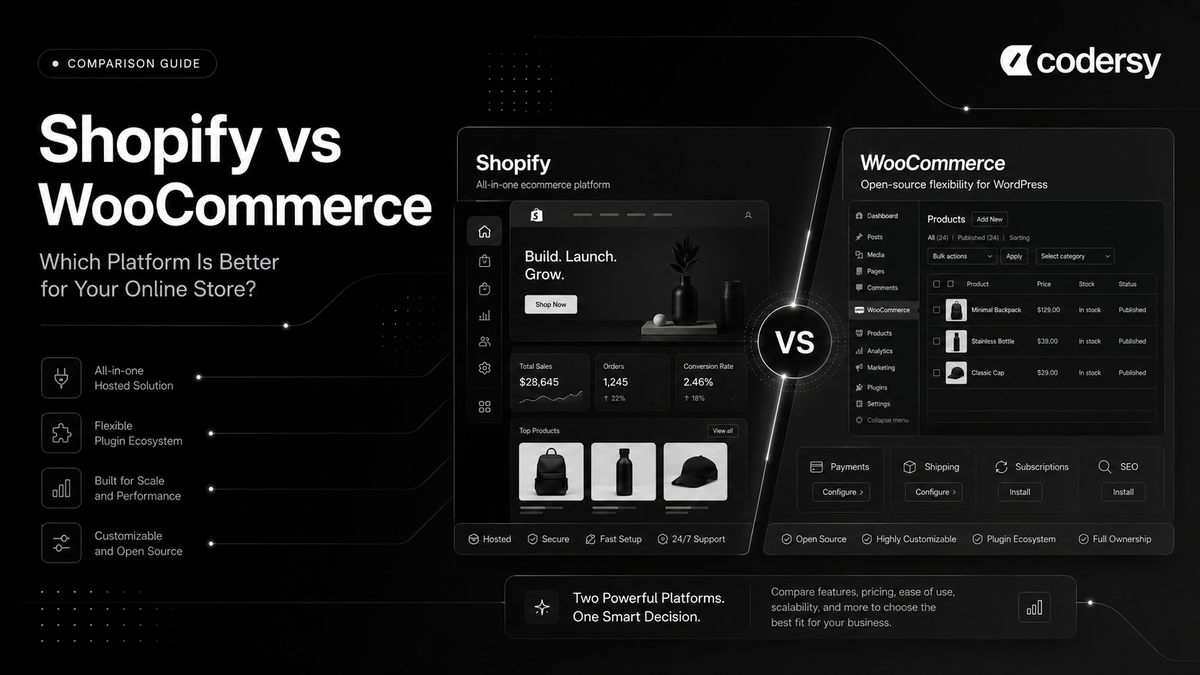
Shopify gives you a managed commerce platform. WooCommerce gives you an open-source ecommerce platform that you control.
Shopify brings store management, hosting, checkout, inventory, orders, and other commerce tools into a centralized platform environment.
WooCommerce takes a different approach. It is an open-source ecommerce platform built for WordPress, giving businesses control over areas such as hosting, extensions, checkout customization, and the underlying technical environment.
Neither model is automatically better.
A managed platform can reduce the number of technical decisions a business needs to make. An open-source system can provide greater freedom over how the store is hosted, customized, and extended.
The real decision is whether your business benefits more from reducing technical responsibility or from owning more of the technical stack.
The Real Difference: Convenience vs Control
The Shopify vs WooCommerce decision is often described as a choice between ease of use and flexibility.
That is partly true, but it is too simplistic.
A better way to think about the difference is convenience versus control, together with the responsibilities that come with each.
With Shopify, many parts of the commerce infrastructure are brought into the same platform. A business does not need to separately choose and manage the core hosting environment, and many daily commerce operations can be handled from the Shopify admin.
This can reduce technical overhead, especially for teams that want to focus primarily on products, marketing, customer experience, operations, and growth.
But that convenience comes with boundaries.
You are building within Shopify's ecosystem, development model, platform rules, and technical architecture. Shopify can be customized extensively, but businesses do not have unrestricted control over every layer of the platform.
WooCommerce approaches the problem from the other direction.
Because it is built on WordPress and is open source, businesses can have much deeper control over hosting, code, extensions, integrations, database access, and technical implementation.
That freedom can be extremely valuable for the right business.
But more control also means more decisions and more responsibility.
Someone has to choose the hosting environment. Someone has to evaluate themes and extensions. Someone needs to manage updates, investigate conflicts, monitor performance, and decide how different parts of the technical stack should work together.
This is why comparing Shopify and WooCommerce only by counting features misses the most important point.
The same freedom that makes WooCommerce powerful can also make it more demanding to manage. The same platform boundaries that can make Shopify restrictive in some situations can also make it easier to operate.
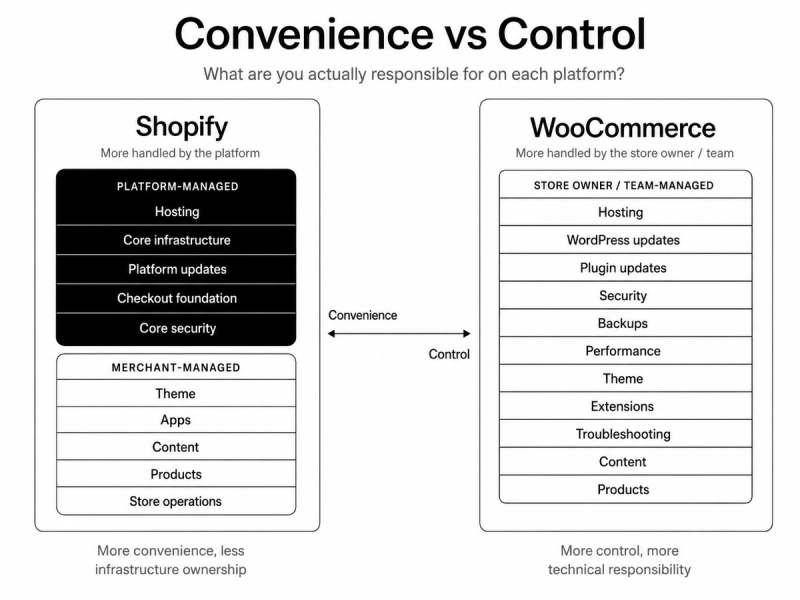
What Are You Actually Responsible for on Each Platform?
The difference between Shopify and WooCommerce becomes much clearer when you stop comparing features and start comparing responsibilities.
A store owner does not only need a platform that can technically support a feature. Someone also has to maintain the environment in which that feature runs.
With Shopify, the platform manages the core hosting infrastructure and many platform-level technical responsibilities. Store owners still need to manage their theme, apps, permissions, content, products, integrations, and overall storefront quality, but they are not responsible for assembling the core commerce environment from separate hosting and software components.
WooCommerce gives businesses more control over that environment, but the responsibility is distributed differently.
A WooCommerce store runs within a WordPress setup, which means the business or its technical partners may need to manage hosting decisions, WordPress and plugin updates, backups, compatibility, security configuration, database health, performance optimization, and troubleshooting across different parts of the stack.
That does not mean every WooCommerce merchant handles these tasks personally. A managed host, agency, freelancer, or internal development team can take responsibility for much of the technical work.
But someone still has to own those decisions.
The important point is not that one model removes responsibility completely.
It is that Shopify concentrates more responsibility at the platform level, while WooCommerce gives the store owner greater control over decisions that also need to be managed over time.
Cost Is Not Just the Monthly Subscription
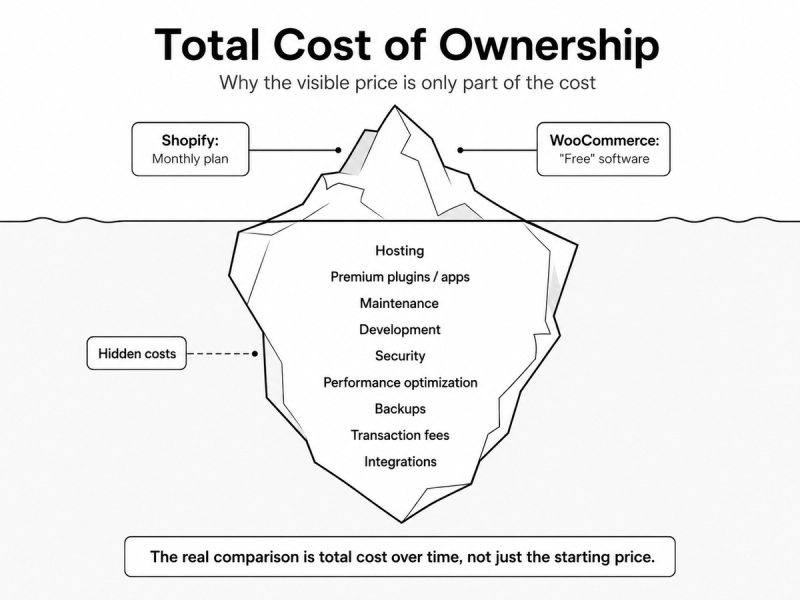
A Shopify vs WooCommerce pricing comparison becomes misleading when it looks only at the visible platform fee.
The common comparison usually sounds simple: Shopify charges a subscription, while WooCommerce is free.
Technically, the core WooCommerce software is open source and does not charge a platform fee. But that does not mean running a WooCommerce store has no cost.
Depending on the business and technical setup, the total cost can include:
- hosting,
- domain registration,
- premium themes,
- paid plugins and extensions,
- development work,
- technical maintenance,
- security work,
- performance optimization,
- backups and infrastructure services,
- troubleshooting,
- and the internal time spent managing the system.
WooCommerce itself explains that the cost of ownership can vary depending on the hosting, development, extensions, and services a store chooses.
Shopify has a more visible subscription-based pricing structure, but the subscription is also not the full cost of operating every Shopify store.
Businesses may also pay for apps, premium themes, custom development, integrations, and other services depending on what the store requires.
The better question is therefore not:
Which platform has the lower starting price?
It is:
What will this store cost to build, operate, maintain, and improve over the next several years?
That is where the idea of total cost of ownership becomes more useful than comparing a monthly Shopify plan with the price of the WooCommerce software itself.
For example, a relatively simple WooCommerce store with efficient hosting and limited extension needs may be inexpensive to operate.
A complex WooCommerce store that depends on multiple premium extensions, ongoing development, infrastructure management, and regular technical support can have a very different cost structure.
The same is true on Shopify.
A straightforward store using mostly native functionality may have relatively predictable software costs, while a more complex setup with multiple paid apps, custom integrations, and ongoing development can increase the total cost significantly.
Transaction costs also need a separate comparison.
A Shopify vs WooCommerce transaction fees comparison is not as simple as saying that one platform charges transaction fees and the other does not.
Shopify explains that payment-related costs depend on factors such as the Shopify plan and payment setup. Third-party transaction fees can apply when a merchant uses an external payment provider instead of Shopify Payments, according to Shopify’s official documentation.
WooCommerce itself does not take a platform percentage of store revenue, but payment processing still has a cost. The actual transaction fee depends on the payment provider, payment method, merchant location, customer location, currency, and other conditions.
For example, WooPayments uses a pay-as-you-go fee model, with fees depending on the transaction and market, based on WooCommerce’s official WooPayments fee documentation.
This distinction matters because platform fees and payment processing fees are not the same thing.
What Happens When Your Store Becomes More Complex?
Most stores do not stay as simple as they were on launch day.
A business may start with one market, a limited product catalog, straightforward pricing, and a small number of integrations.
Then the requirements change.
The store may need:
- multiple markets,
- different currencies,
- regional pricing,
- ERP or inventory system integrations,
- subscriptions,
- B2B pricing,
- customer-specific catalogs,
- marketplace connections,
- complex shipping rules,
- custom product data,
- or internal workflows that do not fit a standard setup.
At that point, the Shopify vs WooCommerce decision becomes less about individual features and more about how each platform handles growing complexity.
Shopify often approaches complexity through a combination of native commerce features, apps, APIs, and custom development within the Shopify ecosystem.
For example, Shopify offers native B2B functionality for eligible Shopify Plus stores, including features for managing B2B and D2C sales within the Shopify environment, based on Shopify’s official B2B documentation.
The advantage of this model is that much of the complexity remains connected to a managed commerce platform.
The limitation is that custom solutions still need to work within Shopify’s architecture, APIs, platform rules, and plan-specific capabilities.
WooCommerce handles complexity differently.
Because businesses have deeper control over the WordPress and WooCommerce environment, they can combine extensions, custom plugins, custom code, hosting configurations, and third-party systems in ways that may provide greater technical freedom.
WooCommerce also supports complex commerce use cases through extensions for areas such as subscriptions, memberships, B2B pricing, wholesale workflows, and other specialized functionality.
But as more parts are added to the system, the business also needs to manage how those parts work together.
An extension may depend on another extension. A custom integration may need to be maintained after platform updates. A performance issue may involve the theme, hosting environment, database, plugin stack, or custom code.
This is not an argument against customization.
It is an argument for understanding its operational consequences.
Complexity does not disappear because a platform is flexible. It simply changes where that complexity is managed.
Shopify vs WooCommerce for Teams Without Developers
One of the most useful questions in a Shopify vs WooCommerce comparison is rarely asked:
Who will actually be clicking the buttons in the admin every day?
The person who builds the store is not always the person who runs it.
In many businesses, daily store operations are handled by:
- a founder,
- an ecommerce manager,
- a marketer,
- an operations employee,
- a customer support team member,
- or a small team where everyone handles several responsibilities.
For these teams, the platform decision affects much more than the initial build.
It affects how easily someone can:
- add or update products,
- change prices,
- create discounts,
- manage inventory,
- review orders,
- process refunds,
- update content,
- check fulfillment status,
- and respond when something unexpected happens.
Shopify allows merchants to manage areas such as orders, inventory, and discounts directly through the Shopify admin, based on Shopify’s official documentation.
For a team without internal developers, the value is not simply that Shopify has an admin interface.
WooCommerce also allows store teams to manage products, orders, coupons, and other daily commerce tasks through the WordPress admin environment.
The more important difference appears when a task stops being routine.
For example, imagine that:
- checkout behavior changes after a new extension is installed,
- the site becomes slower after several plugins are added,
- a WordPress update creates a compatibility problem,
- the payment extension behaves unexpectedly,
- or the theme and plugin functionality start conflicting.
At that point, the person managing the store may need help from a developer, hosting provider, plugin vendor, theme developer, or another technical partner.
The day-to-day question is not only whether the admin is easy to use. It is what happens when the person using it reaches the edge of what they can solve alone.
This is where Shopify can be attractive for teams without developers.
A larger part of the commerce environment is managed within one platform, while routine tasks such as order management, inventory adjustments, and discounts can be handled from the Shopify admin. Shopify’s official documentation covers these functions directly within its administrative environment.
WooCommerce can also be comfortable for non-technical users during normal daily operations. Its documentation shows that order management and coupon creation, for example, can be handled from the WordPress administration area.
The difference becomes more important as the store depends on a larger number of technical components.
A business with a trusted WooCommerce developer, agency, or managed hosting partner may have no problem operating that environment.
A business without those resources may prefer to reduce the number of technical systems and providers involved in keeping the store running.
For a founder-led brand or a small ecommerce team without internal development resources, Shopify will often be the more practical operational model.
For a business that already has reliable WordPress expertise and technical support, WooCommerce may be just as manageable while providing greater control over the wider technical environment.
The platform should fit the team that will actually use it, not only the developer who builds it.
SEO: How Much Control Do You Actually Need?
SEO comparisons between Shopify and WooCommerce are often reduced to a simple claim:
WooCommerce gives you more control, so WooCommerce is better for SEO.
That conclusion is too simplistic.
More technical control can be valuable, but SEO performance does not come from flexibility alone.
It comes from how well a site is structured, how efficiently technical changes are implemented, whether important pages can be crawled and indexed correctly, how strong the content and internal linking are, how the site performs for users, and whether the team can consistently execute an effective search strategy.
Shopify includes built-in SEO functionality and allows merchants to manage areas such as page titles, meta descriptions, body content, and image alt text.
For many ecommerce businesses, this provides a solid foundation.
The challenge is that some technical elements are influenced by Shopify’s platform architecture. A business with highly specific requirements may need custom development, careful information architecture, or workarounds for areas where the platform offers less direct control.
WooCommerce gives teams broader control over the WordPress environment.
Because businesses can choose their hosting, plugins, themes, code-level customizations, and broader technical setup, experienced teams can shape more parts of the SEO implementation around their own requirements.
That can be useful for businesses with:
- complex content strategies,
- unusual site architecture,
- advanced filtering requirements,
- highly customized structured data,
- specific crawling and indexing rules,
- or strong dependencies on the wider WordPress publishing ecosystem.
But greater flexibility creates another question:
Does the team have the resources to use that control well?
The ability to install another SEO plugin, modify templates, change technical logic, or customize the server environment does not automatically produce better organic performance.
Poor implementation can create problems on either platform.
A Shopify store can suffer from weak internal linking, thin category content, unnecessary app scripts, poor theme implementation, or an unplanned site structure.
A WooCommerce store can suffer from plugin conflicts, crawlable parameter combinations, inconsistent templates, performance problems, or technical changes introduced by a poorly managed extension stack.
The platform affects what is possible and how changes are implemented, but the quality of SEO execution still matters more than the theoretical number of settings available.
For businesses already using Shopify, a structured Shopify SEO strategy can help address technical foundations, site architecture, category optimization, internal linking, content opportunities, and organic growth within the realities of the platform.
Performance: Platform Problem or Implementation Problem?
Performance comparisons between Shopify and WooCommerce often become too simplistic.
The reality is that store performance depends on both the platform foundation and the quality of the implementation built on top of it.
Shopify manages the core hosting infrastructure, but that does not mean every Shopify store will automatically perform well. Themes, apps, third-party scripts, large media files, and poor frontend implementation can still slow down the storefront, based on Shopify’s official web performance documentation.
The main advantage is that merchants do not need to manage the underlying hosting environment themselves. Their performance work is more concentrated around the storefront layer, including theme code, apps, scripts, tracking, and media.
WooCommerce gives businesses more control over the full performance stack, but more variables also need to be managed.
Performance can depend on:
- hosting quality,
- caching,
- database health,
- theme and plugin quality,
- image optimization,
- custom code,
- and overall WordPress maintenance.
WooCommerce’s official performance guidance covers these areas as part of the optimization process.
A well-built WooCommerce store can perform very well. But the business has more responsibility for making the right technical decisions across the full stack.
So the useful question is not simply which platform is faster.
It is:
Do you want a managed performance foundation with fewer infrastructure variables, or deeper control over the full stack and the responsibility that comes with it?
Decision Scenarios: Which Platform Would We Choose?
A platform comparison becomes more useful when it is applied to real business situations.
The right choice can change depending on the team, technical resources, existing systems, growth plans, and how much operational complexity the business wants to manage.
Here are a few common scenarios.
Scenario 1: First ecommerce brand with a small team
Likely choice: Shopify
A founder-led brand with a small team usually benefits from reducing technical responsibility.
If the same few people are managing products, marketing, orders, customer service, and growth, a more centralized commerce environment can make daily operations easier to manage.
Shopify is often the more practical choice here because the team can focus on running the business instead of coordinating hosting, plugin maintenance, updates, and multiple technical providers.
Scenario 2: Content-heavy WordPress business adding commerce
Likely choice: WooCommerce
A business already built around WordPress may benefit from keeping commerce inside the same ecosystem.
If the website depends heavily on publishing workflows, custom content structures, WordPress-specific functionality, and an existing technical team that knows the platform well, WooCommerce can be a natural extension of the current setup.
In this case, deeper control may create real value rather than unnecessary complexity.
Scenario 3: Growing DTC brand expanding internationally
Likely choice: Usually Shopify, depending on requirements
A growing direct-to-consumer brand often needs to add markets, currencies, integrations, marketing tools, and operational processes without rebuilding the entire technical foundation.
Shopify can be attractive here because the business can scale within a managed commerce environment while using apps, integrations, APIs, and custom development when needed.
For highly specialized workflows or unusual infrastructure requirements, the decision may be less obvious.
Scenario 4: Business with unusual backend workflows and an experienced development team
Likely choice: Depends, with WooCommerce potentially making more sense
Some businesses have requirements that do not fit neatly into a standard commerce setup.
They may need specialized pricing logic, custom data flows, complex integrations, unusual approval processes, or deeper infrastructure control.
For a business with experienced developers and a real need for technical ownership, WooCommerce may provide valuable flexibility.
The important condition is that the team has the resources to maintain what it builds.
Final Verdict
There is no universal winner in the Shopify vs WooCommerce debate.
Shopify is usually the better fit for businesses that want a managed platform, lower technical overhead, and simpler day-to-day operations.
WooCommerce is often the better fit for businesses that value deeper control, already rely on WordPress, and have the technical resources to manage a more flexible setup.
The real decision is not which platform has more features. It is which operating model fits your team, resources, and long-term goals better.
For businesses that decide Shopify is the better fit, professional Shopify store development can help create a stronger technical foundation from the start.