

Shopify Canvas is not just another visual editor for Shopify stores.
The important change is that merchants can now work closer to the theme itself. Canvas lets teams view more of the storefront together, open theme templates, and use Sidekick to create or change parts of the theme from a prompt.
That changes the redesign process.
A Canvas change is not the same as a note in a brief or a static mockup in Figma. It can become part of the theme workflow much earlier. For smaller stores, that can make design work faster. For serious Shopify stores, it creates a new responsibility: every Canvas output needs to be treated according to what it actually touches.
Some Canvas work is only visual exploration.
Some Canvas work is a theme change.
That difference is the whole article.
What Shopify Canvas Actually Changes
Shopify Canvas changes who can create theme-level change.
In the traditional workflow, a merchant could describe a design problem, but the theme usually stayed in the hands of a designer or developer until the work was ready to be tested. Canvas shortens that distance. A merchant, marketer, or internal ecommerce team can now move from an idea to a theme-level draft much faster.
That is useful, but it changes ownership.
A redesign idea no longer stays safely outside the theme until a developer touches it. With Canvas, the idea can enter the store environment earlier. That means teams need to separate three things: a concept, a candidate change, and an approved theme change.
A concept is just direction. It helps the team decide whether the store should look more premium, more editorial, or more conversion-focused.
A candidate change is more serious. It exists close enough to the theme that someone needs to review what was changed.
An approved theme change is production work. It should follow the same standards as any other meaningful theme update.
That is the practical shift.
Canvas can make the redesign brief sharper, but it can also blur the line between “we are exploring an idea” and “we are changing the store.” Serious teams should not judge Canvas output only by how it looks. They should judge it by what part of the theme it touches.
The Real Shift: Faster Store-Wide Design, Not Just Easier Editing
The real shift is not that Canvas makes editing easier.
The real shift is that Canvas makes store-wide changes easier to start.
That matters because Shopify themes are built from reusable parts. A section, block, snippet, template, or app-powered area may appear in more than one place. A change that looks local in a visual workspace can have a wider effect if it touches something reused across the storefront.
This is where Canvas becomes different from a simple design tool.
If a team asks Sidekick to make product cards more minimal, the result may look cleaner in one view. But product cards are rarely just decoration. They can carry sale badges, variant signals, review summaries, vendor names, quick-add behavior, or merchandising logic. Removing or moving those elements may affect collection pages, featured product sections, search results, and campaign pages at the same time.
The same applies to product pages.
A prompt that makes the buy area feel cleaner may accidentally weaken the part of the page that supports conversion. The issue is not that the page looks different. The issue is that the change may affect app blocks, dynamic payment messaging, review placement, size-guide visibility, or custom metafield content that the store already depends on.
That is the real store-wide risk.
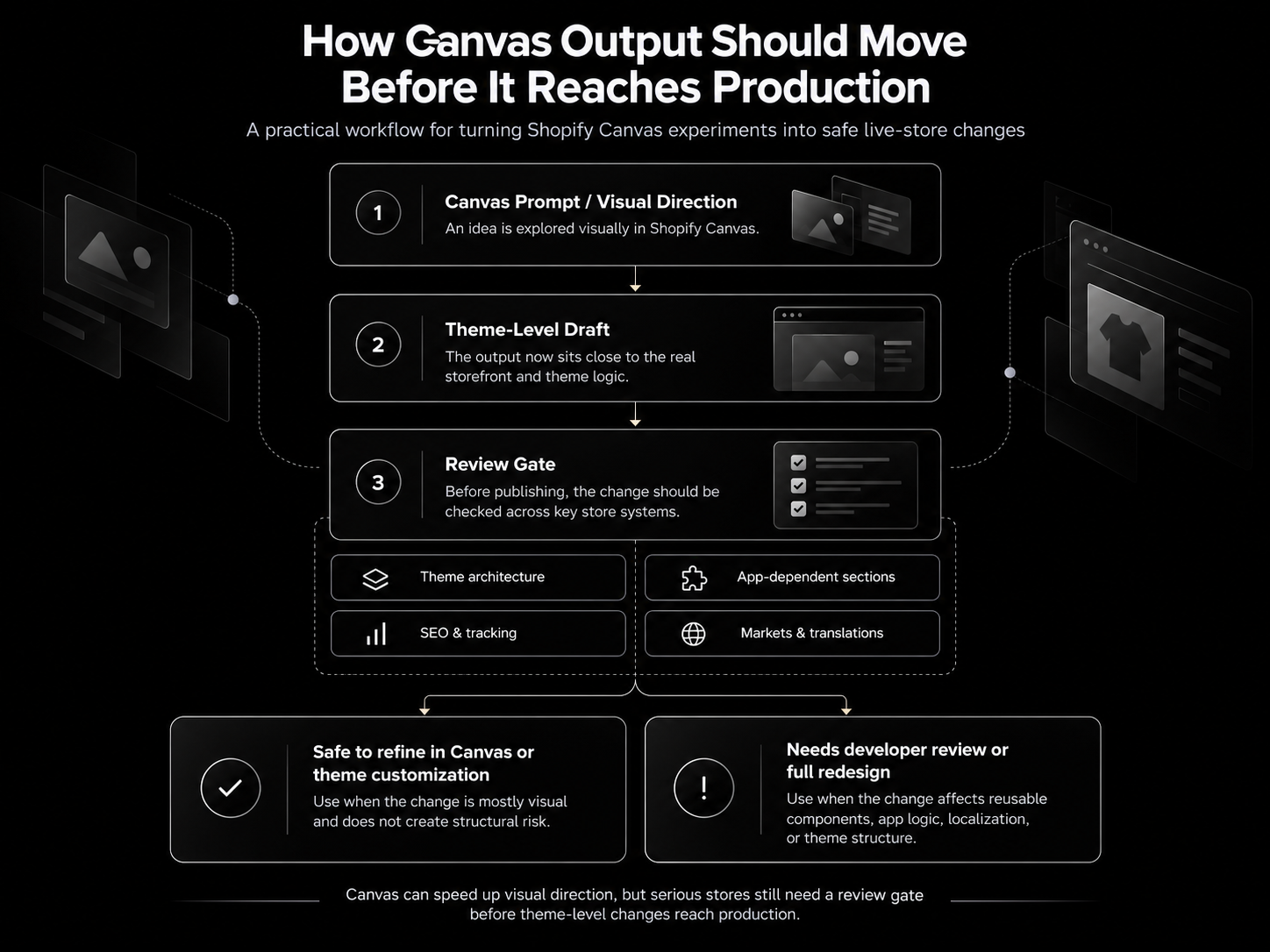
Canvas can show more of the storefront together, but the team still needs to know which parts of the theme are reusable, which parts come from apps, and which parts are tied to SEO or conversion logic.
What Shopify Canvas Means for Custom Themes and Theme Architecture
Canvas is more useful when a theme already has clean architecture.
A well-built Shopify theme usually has reusable sections, predictable templates, clear metafield logic, and components that can be changed without breaking the rest of the store. In that kind of setup, Canvas can help teams test visual direction without fighting the structure underneath.
A weaker theme creates a different problem.
If the storefront is already full of hardcoded fixes, duplicated sections, old campaign code, inconsistent snippets, or app workarounds, Canvas will not magically turn that into a clean system. It may actually make the problem harder to see because the visual result can look better while the theme underneath remains messy.
This is the part merchants often underestimate.
A custom theme is not valuable only because it looks different from a standard Shopify theme. It is valuable because it gives the store a controlled structure. Product cards, collection templates, product page blocks, landing page sections, and reusable content areas should all follow a logic that developers can maintain.
Canvas can work inside that reality, but it should not replace it.
For custom themes, the best use of Canvas is not to randomly generate new layouts. The better use is to test ideas against an existing system. If a new direction fits the theme architecture, it can become useful input for development. If it fights the structure, the issue is probably not a Canvas issue. It is a theme architecture issue.
That is why Canvas does not make custom theme development less important.
It makes weak theme architecture more visible.
The Limits That Matter Before You Redesign in Canvas
Canvas limitations are not just technical notes. They define what kind of redesign should not be done there yet.
The biggest issue is app dependency.
Many Shopify stores do not use apps only in the background. Reviews, subscriptions, bundles, size guides, loyalty widgets, upsells, dynamic payment messages, and product recommendation blocks often appear directly inside the buying experience. If Canvas does not support app blocks and app embeds, then a Canvas redesign cannot be judged only by how clean the page looks. The real question is whether the new layout still supports the app-powered parts of the store that help customers decide, compare, trust, or buy.
Based on Shopify’s Canvas changelog, Canvas has launch limitations around third-party Theme Store themes, Markets, translations, app blocks, and app embeds. For stores that rely on those systems, these are not small feature gaps. They can directly affect whether Canvas is the right place to run a serious redesign.
Markets and translations create a different problem.
A multi-market Shopify store is not always one design translated into several languages. A French storefront may need different copy length, different trust messaging, different promotional banners, or a different way to present delivery and returns. If Canvas does not support Markets and translations at launch, it should not be treated as the main redesign environment for stores where localization is part of the business model.
The third-party theme limitation is just as important.
Many merchants run premium themes from the Shopify Theme Store that have been customized for years. If Canvas cannot support that theme, the decision is no longer about whether Canvas is convenient. The store first needs to decide whether it should keep customizing the existing theme, move to a supported base, or rebuild the frontend more deliberately.
This is why Canvas should be evaluated before redesign work starts.
For a simple store, the limitations may only slow down the workflow.
For a serious Shopify store, they can change the entire redesign path.
Canvas vs Theme Customization vs Full Redesign
Canvas, theme customization, and full redesign are not three versions of the same service.
They solve different problems.
Canvas is useful when the store needs faster exploration or lighter visual direction. Theme customization is better when the store already has a solid foundation, but specific templates, sections, or components need to be improved. A full Shopify redesign makes sense when the issue is deeper than appearance and the store needs a better structure, clearer user journey, cleaner theme logic, or a more scalable frontend system.
| Situation | Best fit | Why |
|---|---|---|
| The store needs a visual direction before deeper work starts | Canvas | The team can test direction quickly before committing to development. |
| The homepage feels outdated, but the rest of the store works well | Canvas or theme customization | A full rebuild may be unnecessary if the issue is isolated. |
| Product pages need better structure, trust elements, or app placement | Theme customization | The work touches conversion-critical parts of the theme. |
| Collection pages depend on filters, badges, merchandising, or product card logic | Theme customization | The visual layer is connected to browsing and product discovery. |
| The store uses custom Liquid, metafields, reusable components, or complex templates | Theme customization or full redesign | Changes need developer review and architectural control. |
| The store feels inconsistent across homepage, PDP, collection, and content templates | Full redesign | The problem is likely structural, not just visual. |
| The store is expanding across markets or languages | Full redesign | Markets, translations, and localization need to be planned into the structure. |
| The theme has years of quick fixes, duplicated sections, and app workarounds | Full redesign | More small edits may add to the technical debt instead of solving it. |
The practical decision is simple.
Use Canvas when the problem is direction.
Use theme customization when the structure is mostly right, but important parts need improvement.
Use a full redesign when the existing theme no longer supports how the business sells, scales, or maintains the store.
What Still Needs a Developer?
Canvas can reduce the need for small visual requests, but it does not remove the need for theme ownership.
A developer is still needed when the change touches the structure behind the storefront. That includes custom Liquid logic, reusable sections, product cards, metafield-driven content, app-dependent templates, tracking scripts, performance-sensitive code, or anything that affects how the theme is maintained after launch.
This is especially important when the store already has custom logic.
A product page may use metafields to show care instructions, delivery notes, warranty information, or technical specifications. A collection page may use custom badges to highlight bestsellers, sale items, low-stock products, or product types. A theme may also have snippets that control the same component across several templates.
Canvas may help change how those areas look, but a developer needs to understand what those areas do.
That is the difference between editing a layout and owning a theme.
A serious Shopify store needs someone who can check whether a visual change has affected reusable code, app placement, schema markup, tracking events, load speed, or mobile behavior. The risk is not only that something breaks immediately. The bigger risk is that the theme becomes harder to maintain because nobody knows which changes were intentional, which were generated during exploration, and which still belong in the production codebase.
For custom themes, developer review is not a formality.
It is how the store protects its architecture while using Canvas as a faster design layer.
Before You Publish: A Canvas Redesign QA Checklist
A Canvas redesign should not go live just because the preview looks clean.
Before publishing, the team needs to check the parts of the store that can affect sales, search visibility, tracking, and theme stability. This is especially important if Canvas was used on product templates, collection pages, landing pages, or any section connected to apps.
A Canvas layout that changes headings, internal links, product schema, or indexable collection content should also be checked against the store’s existing Shopify SEO structure before it is published.
| Area to check | What to verify before publishing |
|---|---|
| Theme scope | Confirm whether the change affects one template, one section, or a reusable component used across the store. |
| Product cards | Check if badges, review summaries, quick-add buttons, variant signals, and merchandising logic still appear correctly. |
| Product page | Make sure reviews, size guides, dynamic payment messaging, delivery notes, product metafields, and trust elements are still visible where customers need them. |
| App-powered sections | Test review apps, bundle apps, subscription widgets, loyalty blocks, upsells, search tools, and any embedded app elements that support buying decisions. |
| SEO structure | Review H1 and H2 hierarchy, internal links, collection content, product schema, canonical behavior, and indexable templates. |
| Tracking | Confirm that analytics events, add-to-cart tracking, checkout events, pixels, and marketing tags still fire correctly. |
| Mobile layout | Check the edited templates on real mobile breakpoints, especially product pages, sticky buy buttons, filters, and cart entry points. |
| Performance | Test whether new sections, media, scripts, or app placements have slowed down key pages. |
| Markets and translations | If the store sells internationally, confirm that localized content, market-specific layouts, and translated templates are not being ignored or overwritten. |
| Rollback plan | Keep a safe copy of the previous theme version and document what changed before publishing. |
This checklist is not meant to slow the team down.
It is meant to stop a visual improvement from becoming a production problem.
The best Canvas workflow is simple: explore quickly, review carefully, publish only when the theme, apps, SEO, tracking, and mobile experience still work as expected.
Final Thoughts: Canvas Makes Design Faster, Not Automatically Safer
Shopify Canvas is a useful step forward for store design.
It can help merchants and teams see redesign ideas sooner, compare directions faster, and understand whether the store needs light visual cleanup, theme customization, or deeper redesign work.
But the more serious the store is, the more carefully Canvas needs to be used.
For small changes, it may reduce friction. For custom themes, app-heavy stores, international storefronts, or SEO-sensitive templates, it should be treated as part of the redesign workflow, not the entire workflow.
Canvas can help create the direction.
A strong Shopify store still needs architecture, review, QA, and development discipline before that direction becomes the live experience.
Planning a store redesign?
We redesign Shopify stores that have outgrown their storefront, and keep what already works: your data and the flows customers know.
The checklist we run before touching a client's code
Get it by email, plus a few short notes over the next two weeks: what we see most often on Shopify stores and what actually fixes it.
Want more of our posts in your Google results? Add Codersy as a preferred source.
Add Codersy on Google(opens in a new tab)