
When building a modern e-commerce brand, every visual detail matters. While Shopify provides an incredible infrastructure for your online store, leaving the default "Powered by Shopify" credit in your footer can hold your design back. It makes an independent storefront look less like a unique brand and more like a generic platform template.
Fortunately, clearing this text out is a quick and straightforward customization. In most cases, you can polish your footer in less than two minutes without touching a single line of code. This step-by-step guide will show you exactly how to do it.
What Does “Powered by Shopify” Mean?
The "Powered by Shopify" message is a default footer link automatically added to every new store running on the platform. It acts as a standard platform credit embedded within your theme's default wording.
While leaving it active is completely harmless and will not impact your store's security, checkout, or payments, removing it is a standard branding practice. Removing this text helps create a cleaner, more exclusive storefront aesthetic where the focus remains entirely on your products, navigation links, and legal policies. The important thing is that removing it is a normal customization covered in the Shopify Help Center.
How to Remove Powered by Shopify Without Editing Code
The easiest way to get rid of Powered by Shopify is to use Shopify’s built-in theme content editor.
This is usually the best first step because it avoids editing theme files directly and lowers the risk of accidentally breaking your footer layout.
Removing It From the Main Store Footer
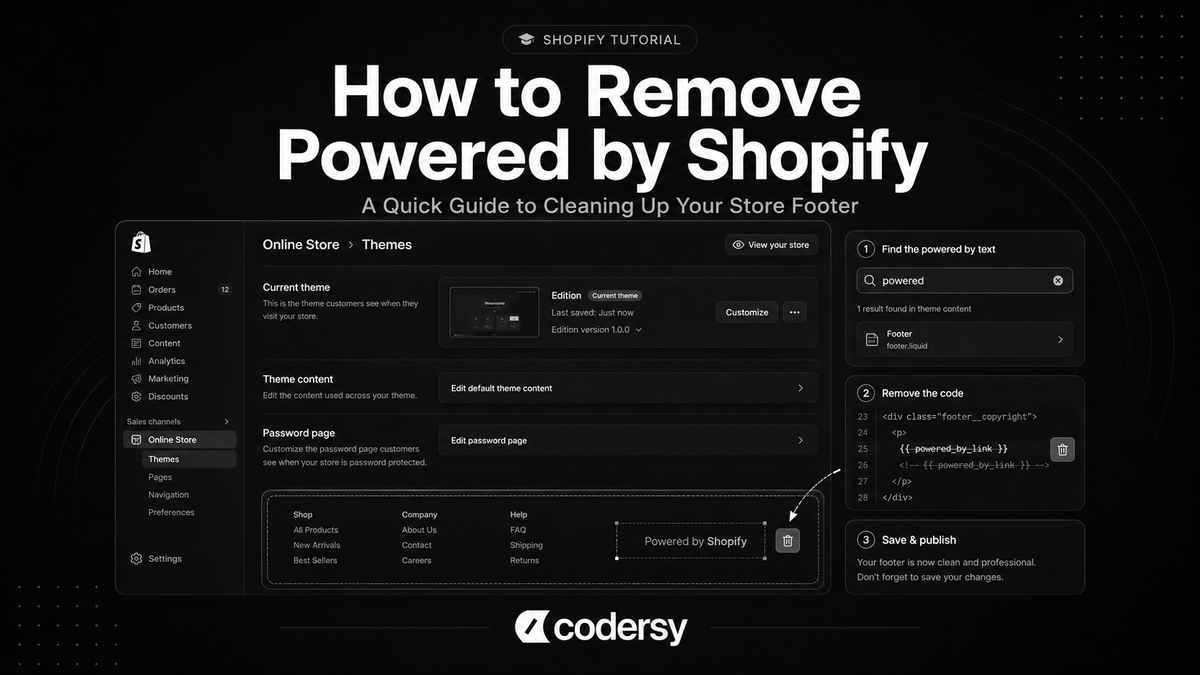
Based on Shopify’s official removal guide, the process usually looks like this:
- From your Shopify admin, go to Online Store > Themes.
- Find your active live theme.
- Click the ... menu next to the theme.
- Select Edit default theme content.
- In the search box, type powered.
- Find the Powered by Shopify field.
- Enter a single space in the field.
- Click Save.
After saving, refresh your live store and check the footer.
In many cases, this is enough to remove Powered by Shopify from footer without touching theme code.
This method is also safer for store owners who are not comfortable editing Liquid files. You are changing theme wording, not deleting code from the theme.
Removing It From the Password Page / Coming Soon Page
If your store is still locked before launch, the text will likely still show up on your password page. You do not need to go through a whole new process to fix this.
While you are still inside the Edit default theme content menu from the steps above, simply scroll down to the Password page section or look for the Powered by Shopify HTML field. Just like before, enter a single space here and hit save. This ensures your brand looks polished even before the official launch.
How to Remove Powered by Shopify Using Theme Code
If the no-code method does not work, the message may be coming from the theme code.
This can happen with custom themes, older themes, heavily edited themes, or footers that were changed by a developer or app.
Before editing theme code, duplicate your theme or keep a backup. That gives you a safer version to return to if something breaks.
Shopify’s official guide explains that you can remove the message by editing the theme code and deleting the {{ powered_by_link }} code from the footer file.
The process usually looks like this:
- Go to Online Store > Themes.
- Find the active theme.
- Click the ... menu.
- Select Edit code.
- Open the footer section file, usually footer.liquid.
- Search for
{{ powered_by_link }}. - Remove that line of code.
- Click Save.
This method can work when the footer text is generated directly through the theme code.
However, theme code should be edited carefully. Removing the wrong line can affect footer layout, links, scripts, or other theme elements. If you are not comfortable editing Liquid files, use the no-code method first or ask a developer to review the footer before changing anything.
What If “Powered by Shopify” Still Shows?
If “Powered by Shopify” still appears after you save the change, the first thing to check is whether you edited the correct theme.
Shopify stores can have multiple themes installed, but only one theme is live. If you edited an unpublished theme, the live storefront will not change.
Other common reasons include:
- the text is still active on the password page,
- the browser is showing an old cached version,
- the theme uses custom footer code,
- the message is hardcoded in a custom section,
- a page builder app is overriding the default footer,
- or the footer has been edited by a developer or app.
If you want to hide Powered by Shopify and it still appears, check both the main footer and the password page first. Those are the two most common places where the message can remain.
If the text is coming from custom code, search the theme files for:
powered_by_link
or:
Powered by Shopify
If you find it inside a theme file, remove it carefully or ask a developer to confirm that it is safe to edit.
This is also why it is better to start with the no-code method. If that works, you avoid touching files that may affect the footer layout or other theme elements.
Should You Remove Powered by Shopify?
You do not have to remove Powered by Shopify.
For some stores, leaving it in the footer is not a serious issue. But many store owners remove it because they want the footer to look cleaner and more focused on their own brand.
Removing it can make sense if you want:
- a cleaner footer,
- less platform branding,
- a more custom-looking storefront,
- more control over footer links and text,
- or a more polished pre-launch password page.
This is mostly a branding and presentation decision.
It does not change how your products, checkout, payments, domain, or Shopify plan work. It simply removes a default platform credit from the storefront or password page.
For most stores, removing it is a small cleanup task. It is not a major redesign, but it can help the store feel more finished.
When Your Theme Code Needs a Developer
Removing Powered by Shopify is usually simple, but theme code can become messy when the footer has already been customized.
Developer support may be useful if:
- the message is hardcoded in a custom footer,
- the theme does not have a standard footer.liquid file,
- the footer is controlled by custom sections,
- the store uses an older or heavily edited theme,
- a page builder app controls the footer,
- or removing the code risks breaking footer layout, links, scripts, tracking, or mobile responsiveness.
In those cases, the issue is no longer only about how to take off Powered by Shopify. It becomes a small theme cleanup task.
If the footer is part of a larger storefront redesign, a custom Shopify store build can help keep branding, layout, and theme structure consistent.
For a simple store, you probably do not need a developer. But if the footer is custom, the theme is old, or the code is difficult to understand, it is safer to get technical help before editing theme files.
FAQs About Removing Powered by Shopify
Does removing “Powered by Shopify” affect my store SEO?
Removing Powered by Shopify should not directly affect your store SEO.
It removes a default footer credit. It does not change your product URLs, metadata, page content, redirects, indexing settings, or checkout.
Do I have to remove it again if I change my Shopify theme?
Usually, yes.
The Powered by Shopify text is tied to theme content or theme code. If you publish a new theme, the message may appear again and you may need to remove it from the new theme as well.
Can I replace it with my own custom brand text?
Yes, in many cases you can replace it with your own footer text.
For example, you might use that space for your brand name, copyright notice, contact link, policy links, or another footer message. If the text is controlled by theme code, make the change carefully or ask a developer to adjust it.
Final Thoughts
Removing Powered by Shopify is a small but useful cleanup task for many stores.
Start with the no-code method in Edit default theme content. That is usually enough to remove it from the main footer and password page.
If the message still appears, check whether you edited the active theme, review the password page, clear your browser cache, and search the theme code for powered_by_link.
For most stores, this is not a complicated change. But if the footer has custom code or the theme is heavily edited, handle the change carefully instead of deleting code blindly.