

Shopify Plus SEO is mostly the same work as SEO on any Shopify plan: the platform handles hosting, sitemaps, canonical tags and robots.txt the same way on Basic and on Plus. What changes at enterprise scale is the size of the problems. Plus stores run more markets, more expansion stores, more filters, more variants and more migrations, and Plus gives you a few extra tools for them: up to 20 million URL redirects instead of 100,000, up to 30 languages instead of 20, nine free expansion stores and unlimited B2B catalogs.
This guide covers the SEO issues we see on large Shopify stores and how to handle each one with what Shopify allows in 2026. Every platform fact below was checked against shopify.dev, Shopify's help centre and Google's documentation in November 2026.
What is different about SEO on Shopify Plus?
| Area | All plans | Plus |
|---|---|---|
| URL redirects | Up to 100,000 | Up to 20,000,000 |
| Languages | Up to 20 | Up to 30 |
| Stores | One | Main store plus up to 9 expansion stores |
| B2B catalogs | Up to 3 active | No limit |
| Theme and checkout settings per market | Advanced and Plus | Yes |
| Scheduled sales and drops | Manual or apps | Launchpad |
| robots.txt, sitemaps, canonicals, structured data | Same on every plan |
So there is no "Plus SEO setting". The difference is scale, and the redirect, language and store limits that come with Plus.
URL structure: what you can and can't change
Shopify uses fixed URL prefixes: /products/, /collections/, /pages/ and /blogs/. You choose the handle after the prefix, not the prefix. That is fine for rankings. Spending a migration budget on fighting the prefixes is not.
The issue worth fixing is duplicate product URLs. Liquid's within filter builds product links inside a collection, such as /collections/sale/products/blue-shirt, and Shopify's own documentation warns that this puts the same content on two URLs. Shopify's Dawn and Horizon themes link to the plain /products/ URL. Older or custom themes often don't. On a catalog of thousands of products, that can double the URLs Google has to crawl. Search the theme code for within and switch product links to product.url.
Redirects at enterprise scale
Plus stores can hold up to 20 million URL redirects, against 100,000 on other plans. That headroom matters in two situations: migrations from Magento, Salesforce Commerce Cloud or a custom platform with years of URLs, and large catalogs where products are retired every season.
Import redirects in bulk as a CSV under Content, then Menus, then URL redirects. Map old URLs one to one to the closest new page, not everything to the homepage. When you change a product or collection handle, keep the option to create a redirect checked. For the migration side in detail, see our Shopify Plus data migration checklist.
robots.txt and faceted navigation
Shopify generates robots.txt for you, and you can replace it by adding a robots.txt.liquid template to the theme. Shopify recommends building on its Liquid objects rather than writing plain-text rules, and warns that a wrong edit can lose all of your traffic. Support won't help with these edits, so change it only for a specific reason.
The default file already blocks the admin, cart, checkout and account pages, sorted collection URLs, tag combinations such as /collections/*+*, and collection URLs with two or more filters (/collections/*filter*&*filter*). A collection page with a single filter stays crawlable.
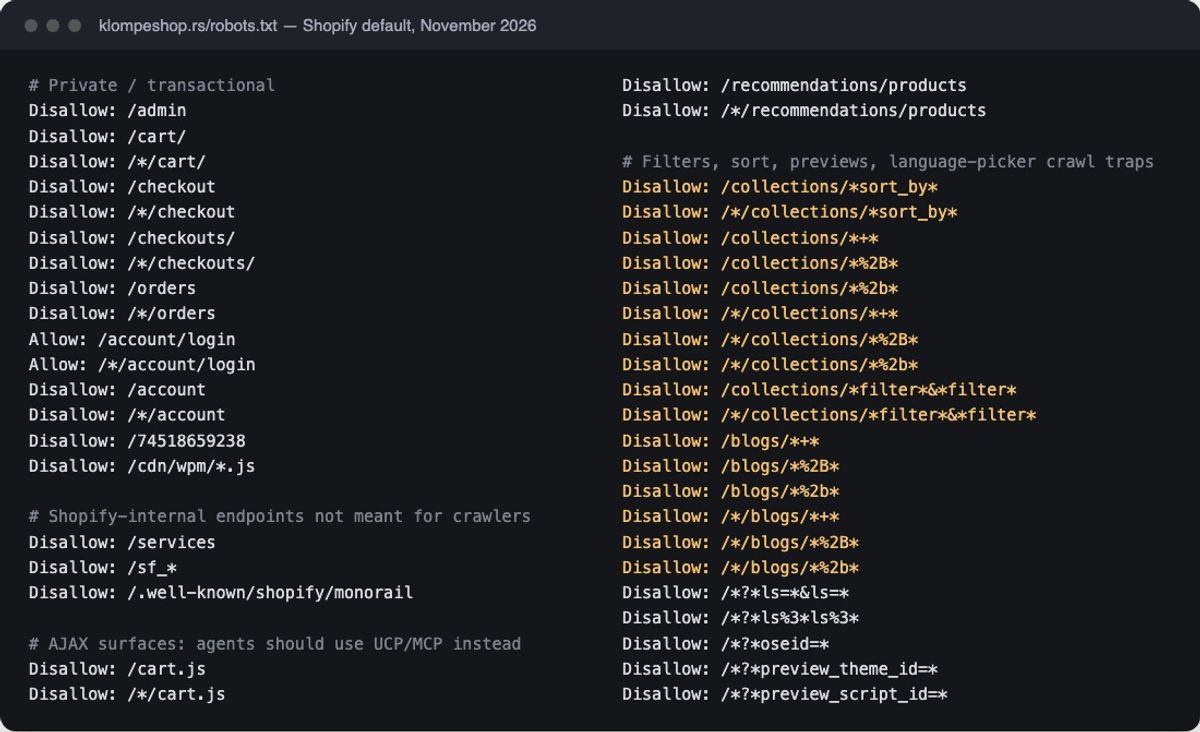
This is where large stores need a decision. Shopify's Search & Discovery filters create URLs like ?filter.v.option.color=red, and a store can have up to 25 filters. In December 2024 Google advised blocking filter URLs in robots.txt if you don't need them indexed, and returning a 404 for filter combinations with no results. Our approach:
- Leave single-filter URLs crawlable only if they match real searches, such as "black linen shirts", and even then prefer a proper collection for that term.
- Build collections for filter combinations that have search demand, with their own title, intro text and internal links.
- Block the rest in
robots.txt.liquidif crawl logs show Googlebot spending its time on filter URLs.
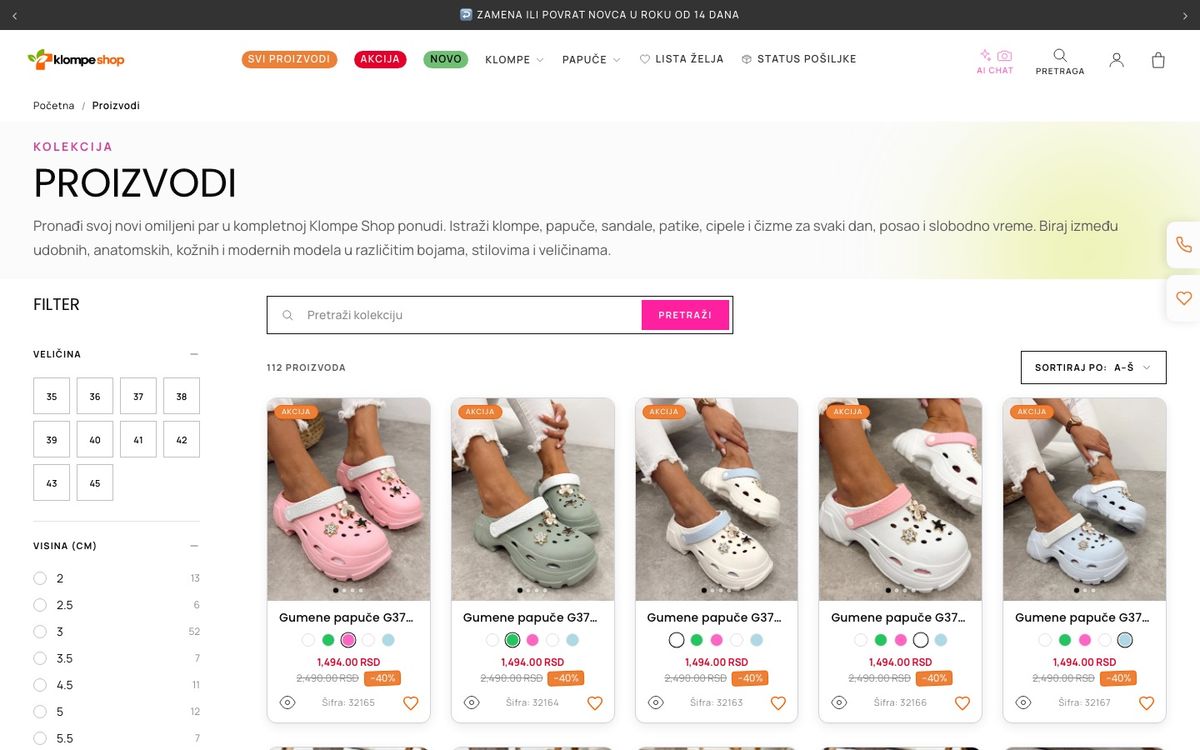
Note that collections with more than 5,000 products don't show filters at all, which is one more reason to split very large collections. Our crawl optimisation guide goes deeper into crawl budget on Shopify.
Variants: 2,048 per product
Shopify raised the variant limit from 100 to 2,048 per product. That lets large catalogs keep one product page where they used to split a product into several, which is good for SEO: one strong URL instead of several thin ones with the same content. If you split products only because of the old limit, consider merging them and redirecting the extras.
Variant URLs (?variant=123) should point their canonical tag at the main product URL. Check this in the page source on a live product. Custom themes sometimes get it wrong.
International SEO: Markets and expansion stores
Most Plus brands sell in several countries, and this is where Plus SEO differs most from a small store.
- Markets in one store: Shopify generates hreflang tags for every market with its own domain, subdomain or subfolder, plus x-default. Each market's sitemap lists only the products available there. Automatic redirects apply to customers but not to search engine crawlers.
- Expansion stores: Plus includes up to nine extra stores. Each is a separate store with its own URLs, so Shopify doesn't connect them with hreflang. You have to add hreflang between stores yourself, through the theme, and keep it updated when products change.
As a rule, keep markets in one store with subfolders unless a market needs a different company, catalog or payment setup. Our Shopify Markets guide covers the choice, and the hreflang guide shows how to check the tags.
Structured data for product pages
Shopify's Liquid structured_data filter outputs schema.org markup for products and articles. A product with variants becomes a ProductGroup, which matches what Google expects for variant products.
For a store where people can buy, Google treats product pages as merchant listings. Those need name, image and an Offer with price and priceCurrency. Shipping details and a return policy are recommended. Google also lets you set a store-wide return and shipping policy under Organization markup, which saves repeating it on every product. Settings in Search Console and Merchant Center take precedence over that markup.
Check with Google's Rich Results Test on a product with variants, a product on sale and a product that is sold out. Large stores often have apps that add a second, conflicting Product block.
Core Web Vitals on large stores
Since March 2024 the responsiveness metric is Interaction to Next Paint (INP), not First Input Delay. Shopify's Web Performance dashboard in the admin shows LCP, INP and CLS from real visitors over the past 30 days, so you can watch the numbers Google uses without extra tools. For comparison, Shopify requires themes in its Theme Store to average a Lighthouse performance score of at least 60 on the home, product and collection pages.
On Plus stores the usual causes of slow pages are apps, not the platform: review widgets, personalisation scripts, chat and tracking tags that load on every page. Remove apps you don't use, load the rest only where they are needed, and check the impact with our Shopify speed test.
Headless and Hydrogen
A headless storefront on Hydrogen moves SEO into your own code. Hydrogen gives you a getSeoMeta utility for meta tags and ships sitemap and robots routes in its template, and preview deployments on Oxygen get a robots disallow so they don't get indexed. Everything else is on you: canonical tags, structured data, redirects and server-side rendering of the content Google needs to see. Plan these before launch, not after traffic drops.
B2B on the same store
B2B is available on Basic, Grow, Advanced and Plus, and Shopify lets one store sell to both B2B and consumers. Plus removes the limit of three active B2B catalogs. Wholesale prices and catalogs sit behind company logins, so they don't create new public URLs. The risk is product visibility: make sure products meant only for B2B customers don't show up in public collections, search and the sitemap without a reason.
Shopify Plus SEO checklist
- Product links use /products/ URLs, not /collections/…/products/….
- Variant URLs canonicalise to the product URL.
- Redirects are mapped one to one after every migration, catalog clean-up and handle change.
- Filter URLs are either built into indexable collections or kept out of the crawl.
- Collections over 5,000 products are split so filters work.
- hreflang is generated for every market, and added manually between expansion stores.
- Product structured data has price, currency and availability, with one Product block per page.
- Core Web Vitals pass in the Web Performance dashboard on mobile.
- Sitemaps are submitted for every domain in Search Console.
- robots.txt edits are documented, so the next developer knows why they exist.
For the full list for any Shopify store, see our Shopify SEO checklist. If you want this done on your store, our Shopify SEO service starts with an audit of exactly these points, and our Shopify Plus team handles the migrations and international setups behind them.
FAQ
Is Shopify Plus better for SEO than other Shopify plans?
Not by itself. Robots.txt, sitemaps, canonical tags and structured data work the same on every plan. Plus helps large stores through higher limits: 20 million redirects instead of 100,000, 30 languages instead of 20, up to nine expansion stores and unlimited B2B catalogs.
Can you edit robots.txt on Shopify Plus?
Yes, by adding a robots.txt.liquid template to the theme, which replaces Shopify's generated file. Shopify recommends using its Liquid objects for the rules and warns that a wrong edit can remove a store from search, so change it only for a clear reason.
How many redirects can a Shopify Plus store have?
Up to 20,000,000 URL redirects. Other plans can have up to 100,000. Redirects can be imported in bulk from a CSV file.
Can you remove /products/ and /collections/ from Shopify URLs?
No. Shopify keeps fixed prefixes for products, collections, pages and blogs on every plan, including Plus. Only a headless storefront gives you full control of URLs, and it doesn't rank better for that reason alone.
Does Shopify Plus handle hreflang automatically?
Within one store, yes: Shopify Markets generates hreflang for every market with its own domain, subdomain or subfolder. Between separate expansion stores, no: you have to add hreflang yourself.
Do Shopify filter URLs hurt SEO?
They can on large stores, by creating thousands of crawlable URLs with near-duplicate content. Shopify's default robots.txt already blocks URLs with two or more filters. Turn filter combinations with real search demand into collections, and block the rest if they waste crawl budget.
Want this kind of result on your store?
We do Shopify SEO that moves rankings and revenue — not just impressions.
The checklist we run before touching a client's code
Get it by email, plus a few short notes over the next two weeks: what we see most often on Shopify stores and what actually fixes it.
Want more of our posts in your Google results? Add Codersy as a preferred source.
Add Codersy on Google(opens in a new tab)